Zune Thoughts - Daily News, Views, Rants and Raves

Be sure to register in our forums! Share your opinions, help others, and enter our contests.


Laptop Thoughts

Loading feed...

Windows Phone Thoughts

Loading feed...

Digital Home Thoughts

Loading feed...


All posts tagged "Sync"


Thursday, August 7, 2008

Zune-friendly Encoding, Fast and Easy with MediaCoder

Posted by Adam Krebs in "Zune Content Creation & Management" @ 01:00 PM

http://www.techronical.com/?p=89

Steven Hughes via Techronical attempts to answer a question that most Zuners encounter at one point or another; how to get high-quality videos in a compact filesize and that don't take a long time to convert. Based on a tip from Long Zheng, Hughes recommends the free (donationware) program MediaCoder, which allows users to import custom encoder presets to help smooth the process and achieve consistent results.
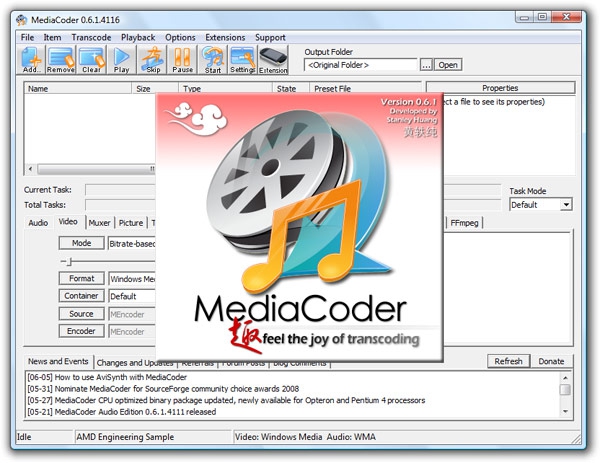
Though Zheng's settings file is MediaCoder-specific, his suggested bitrate, framerate, and resolution should be universal for your favorite encoder.

He recommends:

  • Video:
    Format: Windows Media
    Codec: Windows Media Video 9
    Mode: Bitrate-based
    Bitrate: 768 Kbps
    Resolution: 320×240
    Frame rate: 25 fps
  • Audio:
    Encoder: Windows Media Audio
    Codec: Windows Media Audio 9.2
    Resample: 44100 Hz
    Mode: CBR
    Bitrate: 192 Kbps

Keep in mind that you most likely don't have to use such a high bitrate for audio (typically I use 128 Kbps). If you have a Zune80 and want to display your videos on the TV, you should set your resolution to 640x480 (Zune4, 8, and 30 just leave it as-is). As pointed out by Civisi last week, if you're converting videos manually, you should make sure the Zune software isn't fighting your progress by re-encoding your videos at sync time. Check the Settings page of the software under Device, Conversion Settings to best fit your needs.


Monday, January 21, 2008

Use Any Media Management Program With Zune

Posted by Adam Krebs in "Zune Software" @ 11:00 PM

http://www.zuneboards.com/forums/completed/16810-zalternator.html

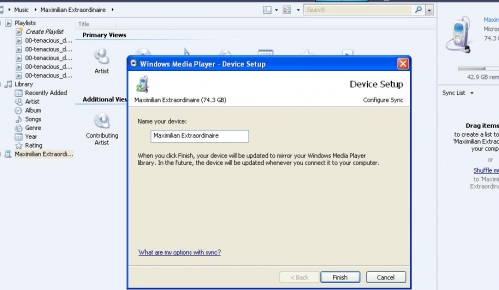
ZuneBoards' renowned PityOnU has just dropped his highly anticipated zAlternator software. The hack, currently in RC, cloaks your Zune as a generic Windows Portable Device, allowing it to theoretically sync with WMP, WinAmp, iTunes, or your favorite media management library. The instructions are pretty basic too.


Yes, that's my Zune in WMP... I can view files, sync, and reverse-sync with the device. It's pretty cool.

Get your device into "sync" mode (have it show "syncing..." with the "starry night" Zune logo on the screen), and hit ctrl-alt-del, bring up Task Manager. Go to the Processes tab and end the process "Zune.exe". Now bring up zAlternator. Follow the instructions, setting the Desired Service Provider to "Generic" and then clicking "apply." Now open your program of choice and everything should be golden.

Just keep in mind that for those wanting to use iTunes (blech), the service is still in beta. Use at your own risk.


Tuesday, July 31, 2007

Ford and Microsoft Roll Out SYNC

Posted by David Tucker in "Thoughts Media Off Topic" @ 11:05 AM

http://www.trendhunter.com/trends/ford-sync-review

“Say, “Play Artist Black Eyed Peas,” and Ford Sync will cue up the Peas in your iPod, Zune or even USB drive. “Dial Mom,” and Ford Sync will use your bluetooth enabled phone to ring your mother. This is the magic of Ford Sync’s revolutionary new technology, developed in partnership with Microsoft.”

Doing a self-mod on your car is one thing. But Microsoft and Ford have really left nothing out on this system. Voice recognition and text to speech? If the future hasn’t arrived then I don’t know what has. The only thing that’s disappointing about the Ford Sync is that it’s not in the Mustang yet!


TrendHunter has done a full review on this cool technology. I know that my next car needs to have something like this in it for sure!

Tags: Ford, Sync

Reviews & Articles

Loading feed...

News

Loading feed...

Reviews & Articles

Loading feed...

News

Loading feed...

Reviews & Articles

Loading feed...

News

Loading feed...

Reviews & Articles

Loading feed...

News

Loading feed...

Reviews & Articles

Loading feed...

News

Loading feed...

Sponsored links