Zune Thoughts - Daily News, Views, Rants and Raves

Be sure to register in our forums! Share your opinions, help others, and enter our contests.


Laptop Thoughts

Loading feed...

Windows Phone Thoughts

Loading feed...

Digital Home Thoughts

Loading feed...


All posts tagged "Encoding"


Thursday, August 7, 2008

Zune-friendly Encoding, Fast and Easy with MediaCoder

Posted by Adam Krebs in "Zune Content Creation & Management" @ 01:00 PM

http://www.techronical.com/?p=89

Steven Hughes via Techronical attempts to answer a question that most Zuners encounter at one point or another; how to get high-quality videos in a compact filesize and that don't take a long time to convert. Based on a tip from Long Zheng, Hughes recommends the free (donationware) program MediaCoder, which allows users to import custom encoder presets to help smooth the process and achieve consistent results.
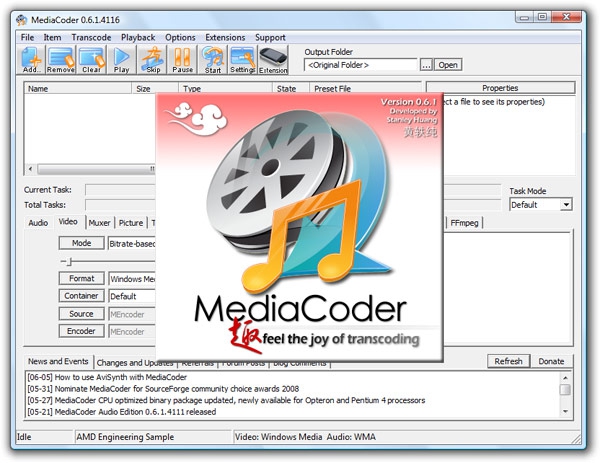
Though Zheng's settings file is MediaCoder-specific, his suggested bitrate, framerate, and resolution should be universal for your favorite encoder.

He recommends:

  • Video:
    Format: Windows Media
    Codec: Windows Media Video 9
    Mode: Bitrate-based
    Bitrate: 768 Kbps
    Resolution: 320×240
    Frame rate: 25 fps
  • Audio:
    Encoder: Windows Media Audio
    Codec: Windows Media Audio 9.2
    Resample: 44100 Hz
    Mode: CBR
    Bitrate: 192 Kbps

Keep in mind that you most likely don't have to use such a high bitrate for audio (typically I use 128 Kbps). If you have a Zune80 and want to display your videos on the TV, you should set your resolution to 640x480 (Zune4, 8, and 30 just leave it as-is). As pointed out by Civisi last week, if you're converting videos manually, you should make sure the Zune software isn't fighting your progress by re-encoding your videos at sync time. Check the Settings page of the software under Device, Conversion Settings to best fit your needs.



Sunday, December 16, 2007

Tip: More Podcasts

Posted by Adam Krebs in "Zune Content Creation & Management" @ 03:00 PM

http://metrointerstellar.com/2007/12/zune-podcast-hack-using-itunes.html

"Ok - I know this might seem backwards, but here me out. You can use *coughs* iTunes *coughs* to get more FREE podcast content on your Zune... Let's face it. Zune doesn't have a ton of choices (yet) while iTunes, which has been at this for quite some time now, has a huge selection ready for download! They're in the same format (mp4) and once you get them to the Zune Software, you can manage them from there - all you need is the initial download from iTunes! So If you can bear using that 'other' media software, click to find out how...."

I can't bring myself to say more about this. Those needing a larger podcast database should by all means find themselves satisfied with iTunes' more mature collection. Just don't come back wondering what that funky odor coming from your keyboard is.

Check ZuneBoards for an excellent and picture-filled step-by-step. Just keep in mind that only the new Zune models (the 4/8 and 80) can natively read mp4 files. If you have a 30, the software'll automatically transcode to a lower-quality file.


Reviews & Articles

Loading feed...

News

Loading feed...

Reviews & Articles

Loading feed...

News

Loading feed...

Reviews & Articles

Loading feed...

News

Loading feed...

Reviews & Articles

Loading feed...

News

Loading feed...

Reviews & Articles

Loading feed...

News

Loading feed...

Sponsored links