Zune Thoughts - Daily News, Views, Rants and Raves

Be sure to register in our forums! Share your opinions, help others, and enter our contests.


Windows Phone Thoughts

Loading feed...

Digital Home Thoughts

Loading feed...

Apple Thoughts

Loading feed...


All posts tagged "update"


Saturday, January 23, 2010

Zune Services Down for Maintenance on Monday

Posted by Jason Dunn in "Zune News" @ 09:57 PM

http://zuneinsider.com/archive/2010...00-p-m-pst.aspx

"The Zune service (Zune Pass, Zune Marketplace, Zune.net streaming and Zune video on Xbox LIVE) will be unavailable due to scheduled maintenance. The Zune service will be offline for up to 24 hours starting at 10:00 p.m. PST on Monday, January 25. As with previous service updates, we recommend you download any new music, video rentals or purchases and sync Zune Pass content prior to the downtime. Content that is stored on your PC or Xbox 360 HDD will remain available during the downtime."

Just like the post above says, the Zune.net services will be down for a while. This is a maintenance update; no new features are going to be rolling out with this release.


Friday, September 4, 2009

Zune Desktop Release Date Confirmed

Posted by David Tucker in "Zune News" @ 11:58 AM

http://www.engadget.com/2009/09/03/...de-zune-hd-lau/

“Unless Microsoft's playing a nasty trick on its loyal fanbase, the latest Zune newsletter confirms a feature-laden software update, very likely what we've been calling Zune 4.0, is due out on Tuesday, September 15th, the same day as Zune HD takes its place among its fading peers.”

I haven't actually gotten my newsletter yet so I'll have to take Engadget's word that that it has a real newsletter. In some of the least surprising news I've heard in a while, its essentially confirmed now that the next iteration of the Zune software will launch with the Zune HD on the 15th.

I'm definitely looking forward to many of the reported features, especially HD movie content. I keep dreaming of the day that I no longer buy my content on media and get it all digitally and I hope that this moves me one step closer!

Tags: software, update, 4.0

Monday, June 8, 2009

Zune.net Going Down Tonight For Upgrades

Posted by Jason Dunn in "Zune News" @ 05:28 PM

Tonight at 10pm pacific time, Zune.net will be going down for some updates - the site is expected to be down for a houew hours. When it's back online, the following new features will have been added:

  • Users will be able to follow an artist, getting news and updates about that artist
  • RSS feed aggregation will allow users to add links to an artist page
  • Performance improvements from distributed caching
  • Enhanced Social data is exposed on the home page - a listening now module and additional recommended content
  • Music video previews and concert dates will be available on Zune.net

That's a pretty decent list of upgrades to the Zune.net experience - though I do pretty much everything via the Zune software client, so I'm not sure how much I'll be using those features. Still, nice to see - hopefully there will be a Zune software client update that brings some of these features into the software.


Tuesday, April 7, 2009

New Zunes Coming

Posted by David Tucker in "Zune News" @ 06:40 AM

http://twitter.com/brianseitz/

There was some Zune news last night via Twitter from Brian Seitz on the Zune team that there will be "new zune hardware this year." This is great, if not entirely unexpected news. Since we really have very little to go on, I expect there will be a lot of speculation as to what form this hardware actually takes. And no reason not to start now!

Personally I think there is going to be a refresh of the flash players. Maybe a few more size options for the flash drive. I wouldn't mind seeing them increase the screen size a bit on the flash models since there is plenty of room for it. I don't think that the Zune 120 will get a lift. I guess they could expand the HDD again but I think overall that model just seems to be at a sweet spot.

I think the biggest addition though will definitely be a touchscreen based Zune. Microsoft needs something to compete against the iTouch. My one hope for all of these models is that the screens are all upped to wide screen and have their resolutions and color depth increased. If the Zune finds itself integrated


Friday, September 19, 2008

Engadget Asks: What Do You Want in 4.0?

Posted by Adam Krebs in "Zune Talk" @ 02:30 PM

http://www.engadget.com/2008/09/18/...-4-0-must-have/

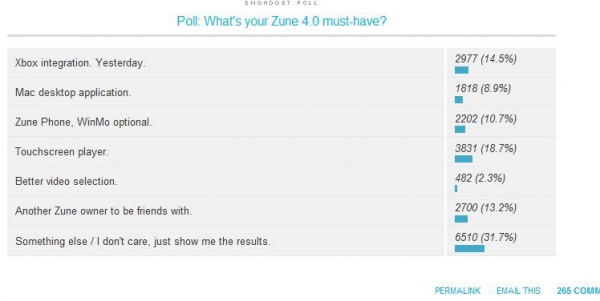
"Now that the dust has settled on Microsoft's impressive, if not quite revolutionary, Zune 3.0 update, it's time for us all to do what we do best: start demanding a new version of desktop and player software -- and a hardware refresh, of course -- chock-full of features that we've been asking for since day one, and a few things we dreamed up along the way. Pick your top-priority from the poll below, or just go nuts in the comments -- the floor is yours."

For me, it's gotta be touchscreen and low-cost models, but for the brand as a whole, I think Zune really needs to get a Mac client out there, if for nothing else than to shut up the haters. In any event, head over to Engadget and sound off! Let 'em know what Zuners want.


Tuesday, September 16, 2008

Zune 3.0 Now Available!

Posted by Darius Wey in "Zune Software" @ 04:40 AM

http://www.zune.net:80/en-US/setup

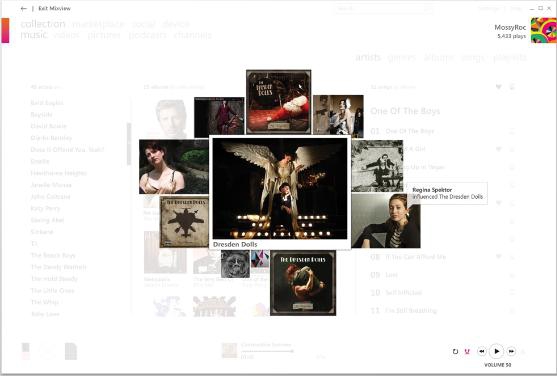
Zune 3.0 has arrived! You should already know what's new and improved, but in case you don't, here's the lowdown. On the desktop side, there's Mixview, Just for You, Now Playing, rich search functionality, and enhanced social features. On the device side, you can now access the Zune Marketplace wirelessly, plus enjoy Buy from FM, Zune Channels, games (Texas Hold 'Em and Hexic), audiobooks, and a clock. To download the Zune 3.0 software, simply visit Zune.net, or if you already have the Zune software installed, run it and wait for the update prompt. Once you have the Zune 3.0 software up and running, connect your Zune to download and install the 3.0 firmware.

We'll be covering all that's new in 3.0 as well as some other significant announcements later today. Stay tuned!


Saturday, September 13, 2008

MixView and Genius: Two Different Approaches to the Same Problem

Posted by Adam Krebs in "Zune Content Creation & Management" @ 10:00 PM

http://blog.wired.com/music/2008/09...recommenda.html

"Microsoft showed us a sneak preview of the Zune 3.0 software it plans to release on Sept. 16 with the latest generation of Zune devices, and what we saw made iTunes' simple Genius feature look like a blast from digital music's past. While iTunes serves up a text list of recommended songs within your library and from the iTunes store, adding to the more basic recommendations its MiniStore feature used to make, Zune reinvented the recommendation concept by collapsing artists, albums and fans into the same recommendation engine, more accurately mirroring the way people think about music. The new feature, called MixView (pictured [below]), displays a single album, artist or user in the center of the screen and surrounds it with related items in a graphical format. ... You can start on an artist and instantly discover which bands influenced that artist and vice versa, by mousing over those surrounding elements in MixView. Double-clicking through to any song plays a 30-second sample, offers a chance to buy the track or, if you're a Zune Pass subscriber, plays the track in its entirety."

I feel that both approaches have their advantages. MixView, since it correlates the music you actually play with other peoples' recent listens, will provide a more current selection of music, showing what's hot now. Also, it's less likely to correlate a song you've never played--for example, I have a large number of songs in my library I've never heard, most of which are utter crap and are therefore songs I don't want to hear more of. With Genius, your entire library is scanned and sent to Apple, matching the nodes against other people with similar libraries to you. This approach is better for songs you haven't heard in a while or downloaded in batch. My roommate, for example, que'd up "This Town" by O.A.R. and Genius returned "Camilo" by State Radio, a band who opened for Dave Matthews Band this summer (Dave Matthews Band and O.A.R. are very similar stylistically).

The problem with the Genius approach is that it can produce some odd results--even during the unveiling keynote on Thursday, when asked to show matching artists to Green Day, Genius returned Jimi Hendrix and John Mayer. We'll have to wait until the Zune 3.0 software is released to make a valid comparison, but I can only hope the algorithms evolve as both technologies mature.


Tuesday, May 6, 2008

Spring Update Around The Net Wrap Up

Posted by David Tucker in "Zune News" @ 09:11 PM

“With those fixes, the Zune software is no longer a show-stopper, and I can recommend the Zune as a credible alternative to the iPod.” - Matt Rosoff, “Digital Noise” @ cnet blogs

“It's a worthwhile bunch of upgrades, if you're into the Zune scene.” - Anders Bylund, Ars Technica

“Unfortunately, news on the video store front isn't so compelling: Microsoft is only adding TV shows at this point, no movies, and there's no way to pull video you've bought on your 360 over to your Zune.” – Paul Miller, Engadget

“There's also improvement in the player itself, like the return of auto playlists and the introduction of gapless playback. Wee!” – Gizmodo

“You’ve heard them say “Welcome to the Social” — well, this is what they’re talking about.” - Devin Coldewey, CrunchGear

Well, if the Zune Spring Update 2.5 was a summer blockbuster, the review teasers would probably look something like that. The final verdict will take several more days of playing with the new software but I know that THIS Zune owner is quite pleased with what this update has given us. The social stuff alone is just fun. The video section is still lacking the one thing I really want to see, which is some sort of subscription option, but I realize that’s hoping for a lot right now.

Overall the reception is pretty positive. Plenty of people still don’t think that it’ll make a difference in the fight to dominate the iPod (which misses the point) but the general consensus does seem to be this is a big step in the right direction.

Tags: update

Wednesday, December 19, 2007

Unsubscribe From Podcasts, Right On Your Zune!

Posted by Adam Krebs in "Zune Talk" @ 10:00 PM

http://www.zuneboards.com/content/view/256/2/

I guess bufixes weren't all yesterday's firmware update included; reader Nick points out and Zune Boards confirms that a certain oft-requested feature has finally been added—you can now unsubscribe from podcasts right from your device. This is great for discovering podcasts and getting rid of the ones you don't like. Users with the 2.3 firmware update can check it out by playing a podcast and bringing up the menu by pressing the center button on the Zune30 or pressing down on the Zune Pad on the 4, 8, or 80. To unsubscribe, simply select "unsubscribe." Nice, right?

EDIT (12/20/07): A ZuneBoards commenter noticed that using "play all" while looking at an artist no longer sorts the list alphabetically by song title. Now, songs are played in alphabetical order by album title, then track number. Neat.


Monday, November 5, 2007

Update Your Zune on November 13

Posted by Darius Wey in "Zune Software" @ 08:30 PM

http://www.zune.net/en-us/meetzune/holiday2007.htm

For existing Zune owners, be sure to mark November 13 on your calendar. A newsletter sent out to subscribers just moments ago confirms this as update day for both the Zune software and Zune hardware. In theory, Microsoft Update will dutifully handle the update process; if not, there'll always be Zune.net for the good ol' manual download and install.

You joined the social last year. This year, you make it you.


Thursday, March 1, 2007

Fix Coming for Zune Skipping Issue

Posted by Aaron Roma in "Zune Talk" @ 07:07 AM

http://zuneinsider.com/archive/2007/02/28/zune-firmware-update-1-3-coming-mid-march-skipping-fixed.aspx

"Yesterday I had a meeting w/ James, the Zune release manager and he spilled the beans on the next firmware update. In Mid March, we’re going to release Zune Firmware Update 1.3. Here’s what’s in the update: We’re fixing the skipping problem that some users were experiencing – that is, content acquired from Zune Marketplace will no longer skip when played on the device."

Well, apparently Microsoft HAS been listening, at least a little, and is finally responding to the skipping issue that many users have complained about. According to Cesar over at Zune Insider, we should see firmware update 1.3 sometime in mid March. This update will fix a few nagging problems, including the skipping issue, improved device detection and syncing, and an issue with the FM tuner draining the battery in sleep mode. Unfortunately, there is still no word on when we might start seeing some new features coming down the pipe.


Tuesday, February 6, 2007

Zune.net Enhanced with New Functionality

Posted by Jason Dunn in "Zune Software" @ 12:32 PM

http://zuneinsider.com/archive/2007/02/05/zune-net-update-tomorrow-account-management.aspx

"Hope everyone had a great weekend. Me? Good, but bummed about the Bears. Tomorrow, around 10 AM (PST), the support page on Zune.net will update, giving you the ability to manage your account from a web browser - no need to sign into the client. This will enable a few things, like:
  • Update, change, or cancel your Zune Pass subscription
  • Buy Points
  • Change the password on your 'Tag
  • Update your credit card info, view your statement
  • More"


Tomorrow is today, and Cesar's comment about the Zune.net site being updated has come to pass. There's nothing terribly exciting here - just some functionality that will make things easier for you to manage your account.


Wednesday, December 20, 2006

High-Resolution Album Art with Firmware / Zune Software 1.2

Posted by Darius Wey in "Zune Talk" @ 08:45 AM

We've had a couple of days to acknowledge that Firmware 1.2 for the Zune was a godsend for having introduced significant enhancements in performance across the board. But there's an extra surprise - one that remains undocumented, so you'll have to see it for yourself to believe it.


You all know that the Zune has a habit of taking high-resolution album art embedded in files, downgrading it to an offensive 200 x 200 (or thereabouts), and then upscaling it to 240 x 240 to fit its QVGA display. Blech! That nasty habit is gone with Firmware / Zune Software 1.2. I performed a little experiment today. I decided to start fresh by nuking the contents of my Zune and the Zune software, re-adding the media to the Zune software, and re-syncing my library. Each and every track in my library has 480 x 480 album art, so if the Zune wants to make album art look good, that's a perfect ingredient to work with. After the sync, I loaded up my first track and noticed immediately that album art looked clearer than ever before. In disbelief, I loaded up a few more and was not left disappointed. The Zune was actually taking advantage of the 480 x 480 album art and scaling it appropriately (without the 200 x 200 intermediary) to 240 x 240 for its QVGA display. There was a catch, though. Artifacts were still visible (but less pronounced), so the Zune was still compressing album art to a degree. But hey, you can't have too much of a good thing all at once. Perhaps Microsoft will tweak this in the next firmware update. ;-)

And now it's your turn to savour the moment. Delete an album or two off your Zune and Zune software, or your entire music library if you're feeling gung-ho, re-add the media, ensure that you have relatively high-resolution album art embedded in your tracks, and re-sync. Can you see the difference?

Note: If you're familiar with the Folder.jpg album art system in PlaysForSure devices, you may be interested to know that the Zune utilizes a similar mechanism. Prior to the availability of Firmware / Zune Software 1.2, 200 x 200 Folder.jpg files would be generated from embedded album art, transferred and converted to another file format on the Zune, and then upscaled to 240 x 240 (blurry). With the updates in place, Folder.jpg files are now 240 x 240 in size - perfect for the Zune's QVGA display. The end result? Clarity.


Tuesday, December 19, 2006

Zune and Windows Vista: The Pictures

Posted by Darius Wey in "Zune Software" @ 08:00 PM


Interested in seeing what Zune looks and feels like in Windows Vista, but don't have a copy of the OS to experience it for yourself? We'll give you a short tour. It feels very similar to the Windows XP version, but there are some minor differences. Read on for more.
Read more...


Zune Desktop Software Update Released

Posted by Jason Dunn in "Zune Software" @ 11:31 AM


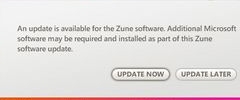
If you fire up the Zune desktop software, it should detect that there's a new version of the software available for download. I did the update and it went smoothly - the download took perhaps 30 seconds, and the install took a few minutes. Unfortunately, it demands a reboot - wasn't there some initiative inside Microsoft to cut down on the number of reboots that software requires? I'm in the midst of burning a DVD with my Windows Media Center Edition 2005 machine, so I can't reboot just yet. Anyone else gotten further than me care to report in on what's new in this version? I couldn't see any notes about updates during the process.


Monday, December 18, 2006

Zune Firmware 1.2 Released

Posted by Darius Wey in "Zune Software" @ 07:40 PM


Microsoft has released Firmware 1.2 for the Zune. It's a great early Christmas present, but if you were hoping to see some new features (proper podcasting support, wireless streaming - you name it), you'll be sorely disappointed. Read on for a drill down of the update experience.
Read more...


Wednesday, November 15, 2006

Support for Vista, Podcasts, and Device-Based Marketplace Access

Posted by Darius Wey in "Zune Talk" @ 10:00 AM

http://news.com.com/2100-1041_3-6135131.html

"And although Microsoft is starting with a small feature list, Erickson said the company will be able to make additions fairly quickly through software updates. First on that list is compatibility with Windows Vista."

Yes, we all know that the Zune is a little crippled in its current form. First, the lack of Windows Vista support, but they're working on that (expect an update by November 30; if not, well before January 30). The lack of support for podcasts is a deal breaker for some, but that's going to be amended in the short term too. You can also expect a new and easy way to get videos on to the device (cryptic, I have to admit). In the long term, Microsoft is hoping to open up the Wi-Fi and perhaps reach out to enemy territory. Flagging and purchasing songs direct from the device? Mac support? It's all under consideration. The Zune team at Microsoft has ideas and wants the consumers to tell them what's hot and what's not, so go on, post 'em in this thread and we'll do our best to ensure they read it. ;-)


Tuesday, November 14, 2006

Zune.net Updated

Posted by Darius Wey in "Zune Talk" @ 03:00 AM

http://www.zune.net/


Microsoft has updated the Zune.net site to coincide with the official launch of Zune. You can download the Zune software or hit the Support page for your fix of how-to and troubleshooting guides, FAQs, manuals, and warranty information.

On an unrelated note, be sure to connect to the net when installing the Zune software. There's a Zune software update and Zune firmware update available for download during the installation process.


Wednesday, November 1, 2006

Microsoft Gives the Xbox 360 Some Zune Love

Posted by Darius Wey in "Zune Software" @ 12:07 AM

http://www.xbox.com/en-US/community/personality/elle/20061030-update.htm

"Part of the change to the streaming story is the addition of Windows Media Player 11 and Zune™ as supported PC streaming software. If you install WMP 11 or Zune, it takes over for Windows Media Connect, and you manage connections from within the player itself (look for Media Sharing in WMP 11 or the Zune software). You can, of course, continue to use Windows Media Connect if you don't install WMP 11 or Zune."


Yesterday's Fall Dashboard update for the Xbox 360 added many new features - among them, support for Zune. With the update in place, the Zune software (or Windows Media Player 11 or Windows Media Connect) allows you to stream content from your Windows XP-based or Windows Vista-based PC to any Xbox 360. The upside here is that you no longer need a Media Center PC, which was originally a requirement when the Xbox 360 launched late last year. In addition, the Dashboard update allows you to stream music, pictures, and video (we're assuming wirelessly) directly from your Zune to an Xbox 360. The moment Zune launches (and the moment we can get our hands on one), we'll show you how the Xbox 360 and Zune add up.


Friday, October 27, 2006

The Misunderstood Zune Upgrade Ability & Why I'm Still Excited...

Posted by Jason Dunn in "Zune Talk" @ 12:00 PM

Since launching this site and diving deep into everything about the Zune, I've noticed a repeating pattern over and over: Zune bloggers, and even Microsoft Zune staffers themselves, have touted the ability to upgrade the Zune as being some sort of amazing ability that other digital media players lack. I'm not sure where this comes from, but even Robert Scoble has fallen into the trap of thinking that this is somehow special. It's not. Every digital media player going back five years or more, has had the ability to be upgraded with new firmware. New firmware usually offers bug fixes, new features, or sometimes removes features (like Creative did with the new Zen Vision:M firmware update that removes FM radio recording).

I believe that confusion comes from people thinking that because the Zune has WiFi built in, that somehow the device will be able to perform stand-alone upgrades without needing to be connected to a PC. Nothing I've read to date indicates that will be possible out of the box - when there's a new firmware update available, you'll get it installed by connecting your Zune to your PC and downloading it with the Zune desktop client software. That's the way it works with the iPod, and that's the way it should work with other players as well, except most have such horrific desktop software clients that no one wants to install them. At best, the Zune has parity with the iPod in this regard: you'll connect your Zune to your PC, and the software will (presumably) inform you there's a new update for your Zune.


Now here's why I'm still excited about the Zune: for all of the frustration I feel about the massively limited WiFi capabilities, I believe firmly that the Zune will evolve more rapidly than any other digital media player on the market. Here's why: since the release of the Xbox 360 about a year ago, there have been three major updates. Read more...


Reviews & Articles

Loading feed...

News

Loading feed...

Reviews & Articles

Loading feed...

News

Loading feed...

Reviews & Articles

Loading feed...

News

Loading feed...

Sponsored links