Zune Thoughts - Daily News, Views, Rants and Raves

Be sure to register in our forums! Share your opinions, help others, and enter our contests.


Laptop Thoughts

Loading feed...

Windows Phone Thoughts

Loading feed...

Digital Home Thoughts

Loading feed...


All posts tagged "id3"


Tuesday, April 15, 2008

AudioShell ID3 Tag Editor

Posted by David Tucker in "Zune News" @ 09:35 PM

http://www.softpointer.com/AudioShell.htm

“I come across a lot of forum postings where people ask how to change the thumbnail art (or cover art) for video files. By default, most video conversion software don’t specify the cover art for a converted video file, so the Zune Software will simply use some random frame from the beginning of the video. The standard tools that people use for setting the meta data for a video file (e.g., TigoTago, zMeta, dSHARPIE) don’t have provision for editing or defining the cover art.”
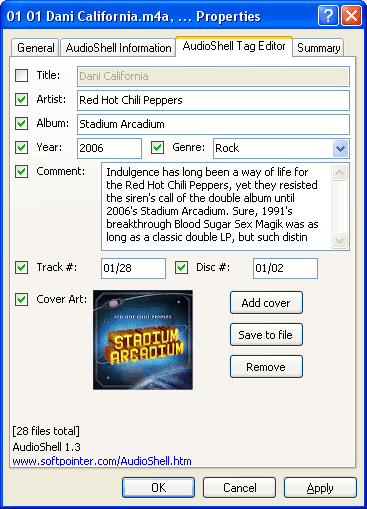
The Zune Tips Webblog spotted this great utility and it was worth mentioning here. The main thing that caught my eye was the ability to change the album art for a video file - which would make AudioShell a very non-standard tool! This is a great feature since the random frame that you usually end up with isn’t always what you want to see. Especially nice is the fact that this isn’t really a program you run on its own: after you install it, you can edit the ID3 tags by right clicking the file itself! Pretty nifty and free.

Tags: id3, utility

Thursday, December 28, 2006

Fix Your Digital Music Collection with FixTunes

Posted by Damion Chaplin in "Zune Software" @ 03:00 PM

http://www.fixtunes.com/

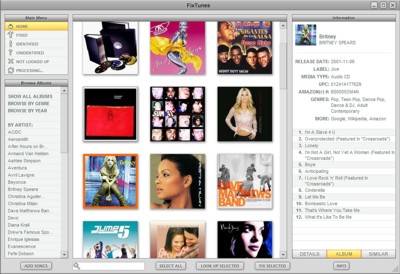
"Your music collection will never be the same. If you have more than a few MP3s on your computer, you know what we're talking about. Missing album names. Misspelled titles. Ten different spellings for the same artist. Browsing is not a pretty experience. You need FixTunes. FixTunes will scan your music files and download the correct artist, album, title, track numbers, release year, genre and even album cover art. No hours spent typing or looking up album names, FixTunes will clean up your MP3 files automatically. And it doesn't just work for popular music, either. FixTunes utilizes a database of over 56,000 artists, over 188,000 albums and over 3 million tracks! Everything from pop, rock, classical and obscure jazz. If the song is from a commercially available CD, chances are its in the database. Other programs claim to help you rename files but still make you type in all the information. FixTunes is automatic - no typing!"

As someone who just spent an entire weekend cleaning up my music collection so it would display properly on the Zune, I can say I really wish I had a piece of software like this. FixTunes looks like a very powerful piece of software that's easy to use. Plus, they have a really cool Album Browser that displays all of the albums you have in a certain category as a pile of graphics on your desktop. You can shuffle them around just like it was a pile of CDs. Double-click an album to play it. Sounds like it would be awesome for parties. FixTunes will run you $24.95 and there's a trial available that will allow you to use it for 50 songs. If you download it, let us know what you think.

Tags: fixtunes, id3, browser

Reviews & Articles

Loading feed...

News

Loading feed...

Reviews & Articles

Loading feed...

News

Loading feed...

Reviews & Articles

Loading feed...

News

Loading feed...

Reviews & Articles

Loading feed...

News

Loading feed...

Reviews & Articles

Loading feed...

News

Loading feed...

Sponsored links