
Wednesday, June 25, 2008
Tip: Restore Downloads from Marketplace
Posted by Adam Krebs in "Zune Software" @ 01:30 PM
So you moved to a new PC, you wiped your harddrive, or you just want to re-download a track you deleted long, long ago. Lucky for you, the Zune team built a feature specifically for this purpose, and it's pretty simple to get to.
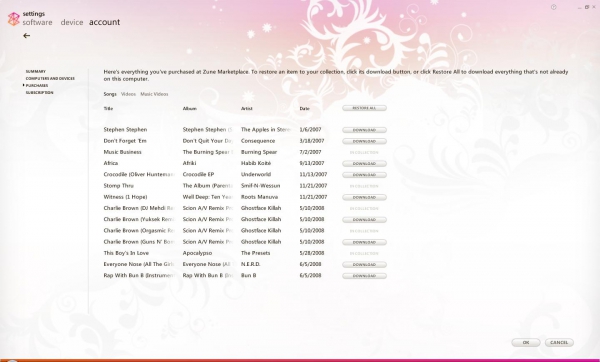
In the Zune software, go to Settings (in the upper-right hand corner of the screen) and then Account. In the left-hand menu select Purchases (it should be the third option down) and then select the individual songs you want to download, or click Restore All to re-download all of your previously-downloaded songs.
In the Zune software, go to Settings (in the upper-right hand corner of the screen) and then Account. In the left-hand menu select Purchases (it should be the third option down) and then select the individual songs you want to download, or click Restore All to re-download all of your previously-downloaded songs.
- Discuss [5 replies]
- Permalink
- Source: My IT Forum